
CALL (800) 825-6858
OR REQUEST DEMO
GuardMetrics
  • Products
    • Guard Tour System Security Software
    • Security Officer App
    • HOA/ Business Neighborhood Watch App
    • Security Guard Incident Reporting Software
  • Devices
  • Capabilities
    • Security Guard Operations Case Studies
    • Guard Tour System Security Software
    • Security Officer Management System
    • Security Guard Checkpoint System
    • Neighborhood Crime Watch
    • Mobile Guard Reporting App
    • Visitor Management System
    • Timekeeping Software for Security Guards
  • Policies
    • Privacy Policies
    • Export Restriction Policy
    • Return/ Refund and Shipping Policy
    • Payment Card Security Policy
    • Global Resellers
  • Free Resources
    • Resource Library
    • Free Security Toolkits
      • Free Security Operations Toolkit
      • Contract Renewal Toolkit
    • Free Security Operations Assessment
    • Free Guard Marketing Playbook
    • Free Operational Checklists
      • Client-Ready Patrol Reporting Templates for Security Teams
      • Patrol Proof & Accountability Checklist
      • Supervisor Patrol Review Checklist for Security Teams
    • The GuardMetrics Blog
    • Guard Wage and Cost Guide
  • Contact
  • Login
    • Customer Support
  • Call: (800) 825-6858
  • Request Demo
  • Menu Menu
  • LinkedIn
  • Mail
GuardMetrics News

U.S. Security Guard Labor Costs 2026 Guard and Stocker Pay Within 50 Cents in 20 States

Security company manager reviewing staffing and payroll costs with a security officer.

GuardMetrics analysis and owner cost guide

Wage reference period May 2025 | Sources checked October 7, 2026

GuardMetrics analysis found that the published median hourly wage estimates for security guards and stockers and order fillers were within $0.50 of each other in 20 of the 50 states. [1] These are May 2025 estimates, the latest BLS release available for this 2026 guide. Nationally, the guard median of $18.28 was $0.33 above the stocker and order filler median of $17.95. [2]

For an owner reviewing pay, that comparison raises a practical question: how does your offer compare with other hourly work in the market where you recruit? Your wage budget also needs to cover the staffing and operating costs behind each post or patrol route.

Use the comparative findings and the reference for all 50 states and DC to review pay. Then use the worked examples to build employer cost, overtime premiums and cost per completed patrol visit from your own inputs. Wage figures are BLS estimates; comparisons and illustrative models are GuardMetrics calculations.

Jump to: Wage findings | Coverage and overtime | Employer costs | Patrol cost | State wage table | Methodology and sources

National security guard wage benchmarks

Estimated hourly wages in May 2025 for Security Guards, SOC 33-9032. All figures are dollars per hour.

Measure All covered industries [2] Selected industry [3]
10th percentile $14.52 $14.46
25th percentile $16.93 $16.96
Median $18.28 $17.96
75th percentile $22.21 $21.72
90th percentile $28.29 $27.25
Mean $20.42 $19.90

Selected industry means security guards employed in Investigation, Guard, and Armored Car Services, NAICS 561610. It is not a contract-guard-only survey. The national middle half of guard wages falls between $16.93 and $22.21.

BLS wages exclude overtime premiums, shift differentials and employer benefit costs. [4] The estimates combine employers and assignments; they do not separate armed, unarmed or mobile patrol work.

What the comparative wage findings show

Using BLS national and state estimates [1, 2], we compared security guards with three hourly occupations from the same period and geography. The national guard median is higher than each comparison median, but the state pattern differs. Counts give each state one count; they are not shares of U.S. guard employment.

Comparison occupation National median Guard median minus comparison States with a lower guard median estimate
Stockers and order fillers $17.95 +$0.33 18 of 50
Janitors and cleaners* $17.71 +$0.57 5 of 50
Retail salespersons $17.03 +$1.25 1 of 50

*Janitors and Cleaners, Except Maids and Housekeeping Cleaners. Occupation codes and calculation rules appear in the methodology. DC is in the full reference table but excluded from the 50-state counts.

Of the 18 states with lower guard estimates, eight gaps were $0.30 or less and 10 exceeded $0.30. The 50-cent grouping describes proximity between published estimates; it does not establish equivalent pay or a statistically significant difference. See the methodology and BLS reliability guidance. [10]


Four markets that show the difference

State Guard median Stocker median Guard minus stocker
California $20.79 $20.61 +$0.18
Florida $17.26 $17.50 -$0.24
New York $21.27 $18.76 +$2.51
Texas $17.30 $17.71 -$0.41

Florida guards had a median $0.24 below stockers and order fillers; Texas guards were $0.41 below. California guards were $0.18 above, while New York guards were $2.51 above. These are same-period comparisons, not current job offers or evidence of why applicants choose a job.

Check local BLS area estimates and current offers alongside the state figures. Compare responsibilities, licensing, driving requirements, shifts and benefits before adjusting pay. State medians can hide differences between the labor markets where your posts and routes operate.

A current Florida planning issue

Florida’s minimum wage increased to $15.00 on September 30, 2026. [5] The May 2025 guard median was $17.26 and the 25th percentile was $15.55. The older estimates do not establish how many guards are affected today. Review your current payroll and client budgets against the new floor and local hiring conditions.

Scenario 1 Coverage hours and overtime

A single-officer post operating continuously requires 168 coverage hours a week and 8,760 hours in a 365-day year. The wage comparison below prices every coverage hour at straight time; leave, training, overtime and other employer costs are added separately.

Hourly wage Weekly coverage wages 365-day coverage wages
$20.00 $3,360 $175,200
$22.00 $3,696 $192,720
$24.00 $4,032 $210,240

Each $1 hourly increase adds $8,760 to this annual coverage wage budget. Moving from $20 to $22 adds $17,520 before employer costs.

Coverage hours do not establish a sufficient roster

At 40 hours per employee, 168 weekly hours equal 4.2 full-time equivalents. Four officers limited to 40 hours supply 160 hours. Another available officer can cover the remaining eight hours at straight time; using overtime instead creates a premium. The roster also needs capacity for leave, training, breaks requiring relief and absences.

Compare the extra overtime premium

For this workweek example, total coverage stays at 168 hours, the regular rate is $22 and overtime pays 1.5 times that rate. Overtime replaces straight-time coverage; it adds the extra $11 per hour, because the first $22 is already in the base budget.

Overtime hours in the week Added premium Total weekly coverage wages
0 $0 $3,696
10 $110 $3,806
20 $220 $3,916

Eight overtime hours would add $88 in this workweek. Premiums belong to the individual officer’s total hours across posts, not just the hours at one client site. [6]

California’s general rules also include daily overtime. Three 12-hour workdays can trigger overtime despite totaling only 36 weekly hours. [7] Apply the actual regular rate and any relevant exceptions or alternative-workweek rules to the roster you are costing.

Scenario 2 Build total employer cost

This illustrative post uses the $22 wage and 8,760 coverage hours above, plus 400 paid hours for leave and off-post training allocated to the post. No overtime is assumed. The employer tax rate is sourced; the other cost inputs are hypothetical company allocations, not industry benchmarks.

Cost element Assumption or calculation Annual cost
Coverage wages 8,760 hours × $22 $192,720
Paid leave and off-post training wages 400 additional paid hours × $22 $8,800
Gross wages Coverage plus noncoverage wages $201,520
Employer Social Security and Medicare 7.65% × $201,520 [8] $15,416
Employer unemployment taxes Assumed annual allocation $1,200
Workers’ compensation Assumed 5.0% × $201,520 $10,076
Health and retirement benefits Assumed annual allocation $10,000
Recruiting, license fees and uniforms Assumed annual allocation $4,000
Total employer cost Gross wages plus employer costs $242,212
Operating overhead Assumed annual allocation $20,000
Total cost before profit Employer cost plus overhead $262,212

Coverage wages already include replacement coverage. The 400 extra hours pay noncoverage leave and training. Employer FICA combines 6.2% Social Security and 1.45% Medicare; each officer is assumed below the 2026 Social Security wage base of $184,500. Calculate taxes by employee. [8]

Translate the budget into a pricing decision

Employer cost is $27.65 per covered hour. Management, general liability and back-office overhead bring cost before profit to $29.93. An illustrative 10% operating margin after these costs, before interest and income taxes, requires dividing unrounded hourly cost by 0.90: approximately $33.26 per billable covered hour. This is a margin on revenue, not a markup or an industry margin benchmark.

The insurance cases below change only workers’ compensation. The 3%, 5% and 8% inputs are hypothetical sensitivity tests, not quoted rates or a claimed market range. Replace them with your policy’s effective cost for the applicable work and payroll.

Workers’ comp assumption Annual workers’ comp cost Cost per covered hour Bill rate at 10% operating margin
3% $6,046 $29.47 $32.75
5% $10,076 $29.93 $33.26
8% $16,122 $30.62 $34.03

All coverage hours are assumed billable. Use actual unbilled work, payment terms and service requirements when setting the price.

Scenario 3 Cost per completed patrol visit

For a mobile patrol route serving property-management or HOA accounts, wages need to be related to completed service. Count travel, required on-site work, reporting and other paid time, then add vehicle costs and the support allocated to the route.

This illustrative route has one eight-hour paid officer shift, 80 total route miles and 20 completed visits that meet the client’s service requirements. The officer wage is $22; an assumed $6 per paid hour allocates additional employer costs. The resulting $28 employer labor rate is specific to this example, not a patrol wage benchmark.

Route cost Example input Cost per shift
Officer employer labor 8 paid hours × ($22 + $6) $224
Vehicle operating and ownership cost 80 miles × assumed $0.75 $60
Dispatch and supervision 0.5 hour × assumed $40 employer cost $20
Other operating overhead Assumed allocation per shift $24
Total route cost Labor, vehicle, support and overhead $328

Use your fleet’s fuel, maintenance, ownership and insurance costs to set the vehicle input. Allocate dispatch and overhead once. This example assumes no overtime; its $6 labor allocation covers employer costs separately from the other route rows. The mileage input is a company cost assumption, not a tax mileage rate.

The number of completed visits changes unit cost

Completed visits Route cost Cost per completed visit
20 $328 $16.40
16 $328 $20.50

Holding the example’s route expenses constant, 16 completed visits instead of 20 increases allocated cost per visit by 25%. That is a planning sensitivity, not a suggestion to shorten required patrols. Visit duration, route geography, service windows and incident workload determine the visits a route can deliver.

Cost per visit is an operating measure. A client may pay per visit, per hour, by retainer or under another arrangement. Compare route cost with the actual contract revenue and service obligations before changing your price or schedule.

Check that the patrol plan fits the paid shift

The 20-visit example can be described as a 480-minute shift. These time inputs are hypothetical and must be replaced with route records.

Paid shift activity Minutes
Driving, including base travel 200
Required on-site work: 20 × 8 minutes 160
Reporting: 20 × 3 minutes 60
Handoffs, breaks and incident allowance 60
Total paid shift time 480

Driving and reporting wages are already inside the eight-hour labor cost. Adding their labor value again would overstate the route budget. More miles or longer required visits also consume time; they cannot be treated as vehicle or service changes alone.

Completing the same required reports in two minutes rather than three would release 20 minutes in this example. Use actual travel and service times to determine whether that supports another compliant visit, incident capacity or fewer paid hours. With the same eight paid hours, the officer’s $176 wage cost remains unchanged.

Use your records to choose the next improvement

Start with one post or route. Compare the required service with recorded hours and completed work. Review officer-level overtime, paid noncoverage hours, fleet cost and the time spent on follow-up. Each improvement should have a measurable effect on expense, service capacity or client delivery.

For a first review of your wage, overtime, reporting and administration inputs, use the Security Operations Cost & Risk Assessment. It provides directional estimates, with detailed results requiring contact information. Use a separate route budget for mileage and cost per completed visit.

Review the workflows behind the cost

GuardMetrics security guard scheduling shows coverage by post and workload by officer, with overtime and assignment warnings when configured.

Its security guard timekeeping helps authorized managers compare scheduled and recorded time and review discrepancies. Management applies the relevant pay rules.

Bring one recurring coverage, overtime or timekeeping issue to a demo, along with the post or route you want to improve.

Request a GuardMetrics Demo

Full state wage reference

May 2025 hourly estimates in dollars. Security Guards, SOC 33-9032, and Stockers and Order Fillers, SOC 53-7065, across covered industries. The table includes all 50 states and DC. A negative final column means the guard median is lower. [1]

State or DC Guard 25th percentile Guard median Guard 75th percentile Stocker median Guard minus stocker
Alabama$13.49$16.21$17.99$16.48-$0.27
Alaska$21.33$22.83$29.04$19.38+$3.45
Arizona$17.15$18.41$21.16$18.03+$0.38
Arkansas$14.30$17.20$19.81$16.68+$0.52
California$17.88$20.79$22.48$20.61+$0.18
Colorado$18.23$21.71$22.88$20.36+$1.35
Connecticut$17.36$19.19$22.84$19.51-$0.32
Delaware$17.31$17.48$21.37$17.99-$0.51
District of Columbia$21.88$30.87$35.67$19.06+$11.81
Florida$15.55$17.26$19.00$17.50-$0.24
Georgia$14.87$16.82$18.78$17.13-$0.31
Hawaii$17.86$20.59$22.19$18.90+$1.69
Idaho$16.55$18.41$22.08$17.94+$0.47
Illinois$17.82$18.98$22.29$18.11+$0.87
Indiana$15.02$17.54$21.37$17.43+$0.11
Iowa$16.58$17.83$21.92$17.62+$0.21
Kansas$15.35$17.83$21.58$17.04+$0.79
Kentucky$15.12$17.03$19.41$17.70-$0.67
Louisiana$14.15$15.50$18.42$16.58-$1.08
Maine$16.71$18.80$21.81$17.89+$0.91
Maryland$17.16$18.37$22.47$18.12+$0.25
Massachusetts$18.13$21.48$22.00$18.05+$3.43
Michigan$16.46$17.83$22.35$17.27+$0.56
Minnesota$17.80$20.86$22.17$17.85+$3.01
Mississippi$12.95$14.03$17.04$16.47-$2.44
Missouri$17.33$19.42$23.09$17.65+$1.77
Montana$16.95$18.50$22.26$18.77-$0.27
Nebraska$17.86$19.15$22.79$17.27+$1.88
Nevada$16.64$17.94$21.44$17.97-$0.03
New Hampshire$18.27$21.73$26.61$17.68+$4.05
New Jersey$16.71$18.69$23.14$17.91+$0.78
New Mexico$17.10$20.83$25.74$17.22+$3.61
New York$17.89$21.27$24.93$18.76+$2.51
North Carolina$14.73$16.83$20.96$17.29-$0.46
North Dakota$16.81$18.90$21.90$17.69+$1.21
Ohio$14.97$17.20$21.39$17.85-$0.65
Oklahoma$14.90$17.44$21.47$16.72+$0.72
Oregon$19.08$21.88$23.28$20.90+$0.98
Pennsylvania$16.62$17.81$21.30$17.62+$0.19
Rhode Island$16.52$17.76$21.40$17.53+$0.23
South Carolina$14.49$17.05$18.38$17.32-$0.27
South Dakota$15.48$17.86$21.72$18.10-$0.24
Tennessee$14.83$17.31$19.53$17.38-$0.07
Texas$14.08$17.30$20.98$17.71-$0.41
Utah$17.51$20.53$21.94$18.12+$2.41
Vermont$18.54$21.90$29.68$17.85+$4.05
Virginia$17.30$20.98$26.37$17.49+$3.49
Washington$20.21$22.64$27.40$21.45+$1.19
West Virginia$10.00$13.85$17.31$16.59-$2.74
Wisconsin$16.84$18.00$22.22$16.83+$1.17
Wyoming$17.08$18.85$23.08$19.03-$0.18

Source: BLS May 2025 state estimates. GuardMetrics calculates guard median minus stocker median from the published hourly estimates. Percentiles describe the wage distribution; they do not prescribe pay for an experience level or assignment.

Methodology and sources

Wage estimates are from the May 2025 BLS Occupational Employment and Wage Statistics release, published May 15, 2026. [9] Sources were checked October 7, 2026. BLS combines six panels across three years and adjusts earlier wages to the reference period. [4]

Selection and reproduction: national_M2025_dl.xlsx and state_M2025_dl.xlsx use cross-industry NAICS 000000 and ownership 1235. Select Security Guards 33-9032, Stockers and Order Fillers 53-7065, Retail Salespersons 41-2031, and Janitors and Cleaners, Except Maids and Housekeeping Cleaners 37-2011. For the selected industry column, use nat5d_6d_M2025_dl.xlsx, occupation 33-9032, NAICS 561610 and ownership 5.

Fields: H_PCT10, H_PCT25, H_MEDIAN, H_PCT75, H_PCT90 and H_MEAN. Round published hourly estimates to two decimals. Differences equal guard H_MEDIAN minus comparison H_MEDIAN within the same geography and period. The 20-state proximity count uses absolute differences of $0.50 or less; the 18-state count uses negative differences, with 10 below -$0.30. Count each of the 50 states once; exclude DC and territories. DC remains in the reference table.

Uncertainty: these are comparisons of published point estimates. The 50-cent band is a descriptive cutoff, not a confidence interval. BLS reports model-error measures for employment and mean wages; the file’s MEAN_PRSE does not give median uncertainty. [10] No median significance test or equivalence test is performed. Counts are not employee-weighted shares or evidence of why applicants choose jobs.

Scenario method: inputs are hypothetical unless a statutory rate is cited. Continuous coverage uses 365 × 24 = 8,760 hours; a leap year uses 8,784. The overtime table is one 168-hour workweek. Add paid noncoverage wages once; apply stated taxes and allocations; divide annual cost by covered hours. The 10% operating-margin example is after listed overhead, before interest and income taxes. Bill rate equals unrounded cost per billable covered hour divided by 0.90. Insurance cases hold other inputs constant. Patrol cost is divided by compliant completed visits; its time budget totals 480 minutes. Retain precision before display rounding.

Scope: this is analysis of public estimates and worked budgeting examples, not a company survey or measured customer results. It does not establish current job offers, a universal burden multiplier, required staffing levels, a recommended profit margin or software savings. Replace allocations with actual payroll, insurance, benefit, vehicle and contract records.

[1] BLS state wage estimates May 2025; state_M2025_dl.xlsx.

[2] BLS national wage estimates May 2025; national_M2025_dl.xlsx.

[3] BLS industry wage estimates May 2025; nat5d_6d_M2025_dl.xlsx.

[4] BLS technical notes May 2025 definitions and estimation methods.

[5] FloridaCommerce minimum wage $15.00 effective September 30, 2026.

[6] U.S. Department of Labor Fact Sheet 4 Security Guard/Maintenance Service Industry under the FLSA.

[7] California DIR overtime guidance General daily and weekly provisions and exceptions.

[8] IRS Publication 15 2026 employer Social Security and Medicare rates and wage base.

[9] BLS release announcement May 2025 estimates; released May 15, 2026.

[10] BLS OEWS reliability guidance Model-error measures for employment and mean wage estimates.

Find area data and readable reference pages through the BLS OEWS tables directory.

For the derived comparisons, credit “GuardMetrics analysis of BLS May 2025 OEWS estimates” and link to this resource and methodology. Individual wage estimates are sourced to BLS. Cite scenarios with their hypothetical inputs and assumptions.

October 10, 2026
GuardMetrics News

Security Guard Operations Cost Assessment: Find the Hidden Costs Holding Back Your Operation


You may know what your guard operation spends on payroll.

But do you know what it is losing through overtime, manual reporting, supervisor follow-up, incident documentation, patrol verification gaps, and limited visibility across posts, sites, officers, and shifts?

That is where the real cost often hides.

Not in one obvious line item. Not in one dramatic failure. Not in one report that went missing.

It hides in the daily grind of the operation:

  • Officers spending too much time completing routine reports
  • Supervisors chasing missing details after the shift is already over
  • Incident reports that need cleanup before they can be trusted or shared
  • Patrol activity that is difficult to verify without extra follow-up
  • Overtime that keeps repeating because coverage pressure never really goes away
  • Managers who cannot see operational weak spots until they become client complaints, budget pressure, audit questions, or leadership concerns

If you manage a security guard company or an in-house security team, these costs matter because they do not just affect the budget. They affect control.

They affect how much confidence you have in your operation.

They affect how quickly you can answer the question every security leader eventually faces:

What is actually happening across my operation — and what is it costing me?

That is why GuardMetrics created the Free Security Operations Cost & Risk Assessment.

It gives you a practical way to turn hidden workload, reporting friction, overtime pressure, and accountability gaps into a clearer cost and exposure snapshot you can actually use.

👉 Start the Free Security Operations Assessment

What Is a Security Guard Operations Cost Assessment?

A security guard operations cost assessment is a structured way to identify where your operation may be losing money, time, visibility, and control.

Instead of guessing where the weak spots are, the assessment walks you through the operating areas that usually create the most pressure inside a guard operation.

It helps you look at:

  • Your number of officers
  • Average officer wage
  • Weekly shift volume
  • Officer reporting time per shift
  • Weekly overtime hours
  • Overtime multiplier
  • Supervisor administrative hours
  • Incident report volume
  • Incident report completion time
  • Patrol verification method
  • Reporting and audit readiness
  • Real-time operational visibility
  • Growth or coverage pressure
  • Your biggest current operational challenge

That matters because the cost of a security operation is not only what appears in payroll.

The real cost includes the labor and management time buried inside the workflow.

If daily reports take too long, you pay for it.

If supervisors spend too many hours chasing missing information, you pay for it.

If incident reports require cleanup before they can be trusted, you pay for it.

If patrol verification is weak, you may pay for it in follow-up time, client confidence, documentation problems, and management uncertainty.

The point of the assessment is simple:

Find the weak spots. See the cost. Start with the fix that matters most.

Why You Should Assess the Operation Before You Try to Fix It

It is easy to assume you already know where the problem is.

Maybe overtime feels like the issue.

Maybe reporting is the obvious frustration.

Maybe supervisors are buried in administrative follow-up.

Maybe clients are asking for better documentation.

Maybe you are adding sites, shifts, posts, or officers and the operation is becoming harder to manage.

But instinct is not enough.

Security operations are too expensive, too labor-driven, and too accountability-sensitive to fix by guesswork.

A structured assessment helps you separate the loudest problem from the most expensive problem.

That distinction matters.

The problem that annoys management the most may not be the one costing the most money. The issue that creates the most overtime may not be the same issue creating the most reporting exposure. The area creating the most client friction may not be obvious until you look at reporting, patrol verification, and supervisor follow-up together.

That is why assessment-based thinking is already common in security planning.

ASIS International describes security risk assessment as a structured process for identifying, analyzing, and evaluating risk. CISA’s Security Assessment at First Entry is also built around the idea that a structured physical security review helps owners and operators identify vulnerabilities and improve security programs.

The GuardMetrics assessment is a practical operational cost and exposure assessment built for security guard operations. It is not a full professional security risk assessment and it is not legal advice.

It helps you answer a more immediate management question:

👉 Start the Free Security Operations Assessment

Where is my guard operation losing time, money, visibility, and control right now?

The Hidden Cost Msost Guard Operations Underestimate

Most security leaders do not ignore costs.

They track payroll. They watch overtime. They know when clients complain. They know when staffing is tight. They know when supervisors are overloaded.

The problem is that some costs are hard to see because they are spread across hundreds or thousands of small actions.

A few extra minutes per shift.

A few more hours of supervisor follow-up.

A few incomplete reports.

A few patrol questions that require manual review.

A few incidents that take longer than they should to document, clean up, and close out.

Individually, they may not look serious.

Across an entire guard operation, they can become a serious drain.

1. Overtime That Keeps Eating Margin

Overtime is sometimes unavoidable.

Posts need coverage. Clients expect service. Hospitals, schools, warehouses, casinos, corporate campuses, residential communities, and commercial properties still need officers on duty.

But recurring overtime is different.

Recurring overtime is not just a staffing issue. It is a margin issue. It is a planning issue. It is often a visibility issue.

If you cannot clearly see how much overtime is being used, where it is coming from, and whether it is tied to preventable workflow problems, the operation becomes harder to control.

The GuardMetrics assessment asks for total weekly overtime hours and overtime multiplier so you can estimate the annual overtime premium tied to your current operation.

That gives you a better question than “Are we using overtime?”

It helps you ask:

How much is overtime really costing us over a full year — and is it covering a temporary need or hiding an operational weakness?

2. Supervisor Time That Disappears Into Administrative Follow-Up

Supervisor time is one of the easiest costs to underestimate.

You may know what your supervisors are paid. But do you know how much of their week is being consumed by manual follow-up?

That includes time spent:

  • Reviewing reports
  • Chasing missing information
  • Verifying patrol activity
  • Handling schedule changes
  • Checking incident details
  • Preparing client updates
  • Following up with officers
  • Manually confirming what happened during a shift

Some of that work is necessary.

But when too much of it is manual, the operation becomes harder to scale.

Your supervisors should not spend their best hours cleaning up preventable workflow friction. They should be focused on oversight, coaching, client confidence, service quality, and problem prevention.

The assessment turns supervisor administrative time into a cost category.

That matters because once you see what manual supervision is costing annually, it becomes easier to decide whether the process needs to change.

3. Daily Reporting Time That Looks Small Until You Multiply It

Five minutes does not sound expensive.

Ten minutes may not sound alarming.

But multiply reporting time across every officer, every shift, every site, every week.

Now the cost becomes real.

Daily activity reports, shift notes, logs, routine reports, and field documentation all matter. The issue is not whether officers should report. They should.

The issue is whether reporting is efficient, consistent, reviewable, and useful.

If the reporting process is slow, manual, hard to retrieve, or difficult for supervisors and clients to use, you are paying for documentation that may still leave management without the visibility it needs.

The GuardMetrics assessment asks how much time officers spend on daily reporting per shift.

That one input can expose a cost that many operations never calculate.

If reporting is one of your weak spots, GuardMetrics’ mobile guard reporting app can help security teams reduce reliance on paper logs and scattered documentation while improving field reporting visibility.

4. Incident Reports That Take Too Long to Complete, Review, and Trust

Incident documentation is where operational cost and operational exposure often meet.

A report that is incomplete, delayed, unclear, or hard to retrieve can create extra work for everyone involved.

The officer spends time writing it.

The supervisor spends time reviewing it.

Management may spend time clarifying it.

The client may need answers.

And if the report is missing details, the cleanup becomes another hidden cost.

The GuardMetrics assessment asks for incident report volume and the average time needed to complete each report.

That helps you see whether incident documentation is a manageable workflow or a recurring administrative burden.

For teams that need cleaner incident workflows, GuardMetrics’ incident reporting system helps organize incident documentation and supervisor review so reports are easier to manage and use.

5. Patrol Verification Gaps That Create Questions You Should Not Have to Chase

Patrol accountability should not depend on guesswork.

If patrol activity is tracked through paper logs, radio calls, spot checks, or inconsistent manual notes, management may not have a clean way to verify what happened.

That creates operational drag.

When a client asks about a patrol, someone has to investigate.

When a checkpoint is missed, someone has to figure out whether the patrol was skipped, delayed, incomplete, or simply undocumented.

When supervisors lack clear patrol visibility, follow-up takes longer.

The assessment asks about your patrol verification method because patrol accountability directly affects operational confidence.

If patrol verification is one of your weak spots, GuardMetrics’ guard tour system helps security teams verify checkpoint activity and improve patrol visibility.

6. Reporting and Audit Readiness Problems That Surface at the Worst Time

Some reporting problems do not feel urgent until someone asks for the records.

A client wants a report.

A manager needs incident history.

A supervisor needs to review activity across a site.

An executive wants to know what happened.

An audit or review requires documentation.

That is when inconsistent reporting becomes expensive.

If reports are hard to find, incomplete, scattered, delayed, or dependent on manual cleanup, the cost shows up in staff time and management frustration.

The GuardMetrics assessment asks whether reports are consistent and easy to retrieve, usable but require cleanup, inconsistent or hard to find, or mostly manual and reactive.

That is a valuable question because reporting quality affects more than paperwork.

It affects confidence.

It affects client communication.

It affects how quickly leadership can understand what happened.

7. Limited Visibility That Keeps Management Reactive

Limited visibility is one of the most dangerous costs because it does not always feel like a cost at first.

It feels like normal management.

A supervisor checks in.

A manager follows up.

Someone calls the site.

Someone looks for a report.

Someone asks whether the patrol was completed.

Someone confirms whether an incident was documented.

But if your operation depends on constant manual checking, you are not managing from visibility. You are managing from friction.

That can work when the operation is small.

It becomes harder when you add officers, sites, shifts, supervisors, clients, or coverage requirements.

The GuardMetrics assessment asks you to rate real-time operational visibility because visibility affects how quickly you can detect issues, respond to gaps, and know where management attention is needed.

Better visibility does not replace management responsibility.

It gives management a stronger operating picture.

What the GuardMetrics Assessment Gives You

The Free Security Operations Cost & Risk Assessment is designed to give you a practical cost and exposure snapshot based on your own inputs.

It does not give you generic advice.

It uses your operation profile to estimate where labor, reporting, supervision, incident documentation, patrol accountability, and visibility gaps may be creating measurable cost and operational pressure.

After completing the assessment, you can see:

  • Estimated annual labor and process cost
  • Overtime premium impact
  • Supervisor administrative time cost
  • Daily reporting labor cost
  • Incident reporting labor cost
  • Exposure indicator
  • Efficiency level
  • Operational insights
  • Priority recommendations

It takes about three minutes, and you see a preliminary estimate before any contact information is requested.

That gives you something useful to work with.

Not a vague “you should improve operations” message.

A clearer view of which operational area may deserve attention first.

👉 See Your Estimated Annual Cost

Who Should Take the Assessment?

Take the assessment if you are responsible for the cost, control, performance, or accountability of a guard operation.
That includes:

  • Security guard company owners
  • Presidents and CEOs of guard companies
  • Operations managers
  • Regional and area managers
  • Security directors
  • Security managers
  • In-house security leaders
  • Facilities and property managers overseeing security teams
  • Healthcare security teams
  • School and university security departments
  • Casino and entertainment security teams
  • Logistics and warehouse security teams
  • Corporate security teams

Hybrid operations using both contract and in-house security
You do not need to be in crisis to benefit from the assessment.

In fact, the better time to assess the operation is before weak spots become client complaints, budget overruns, missed documentation, supervisor burnout, or leadership scrutiny.

How to Use Your Assessment Results

Once you complete the assessment, do not treat the result as a one-time number.

Use it as a management tool.

Look at the category creating the most cost or exposure and ask:

  • Is overtime recurring because of unavoidable coverage needs or preventable scheduling pressure?
  • Are supervisors spending too much time on manual follow-up?
  • Are officers spending more time than necessary on routine reports?
  • Are incident reports clean enough to trust and retrieve quickly?
  • Can patrol activity be verified without extra investigation?
  • Are reports easy to find when clients or leadership ask for them?
  • Is management seeing problems early enough, or only after escalation?
  • Which weak spot would produce the biggest improvement if addressed first?

The assessment does not force you to fix everything at once.

That is not realistic.

It helps you identify the first operational issue worth fixing.

That is how improvement should start: not with guesswork, but with a clearer view of what is costing you the most.

Where GuardMetrics Fits After the Assessment

Once you see where the pressure is coming from, the next step is to decide whether your current workflow gives you enough visibility and control.

GuardMetrics helps security guard companies and in-house security teams improve the daily workflows behind many of the issues measured in the assessment.

If reporting is taking too long, GuardMetrics’ mobile guard reporting app helps officers document activity from the field.

If incident documentation is inconsistent or hard to manage, the incident reporting system helps organize incident records and supervisor review.

If patrol activity is hard to verify, the guard tour system helps improve checkpoint accountability and patrol visibility.

If timekeeping and shift activity are difficult to manage, GuardMetrics’ timekeeping software system app supports cleaner guard timekeeping workflows.

If management needs broader officer oversight, the security officer management system supports operational visibility across officers, posts, reporting, and field activity.

The assessment helps you identify the problem.

GuardMetrics helps you evaluate the workflow behind it.

And when you are ready to look at the workflows directly, you can request a GuardMetrics demo.

Bottom Line: Your Operation May Be Costing More Than Payroll Shows

Payroll tells you what you paid.

It does not always tell you what your operation is losing.

It does not show the full cost of manual reporting, supervisor follow-up, overtime pressure, incident cleanup, patrol verification gaps, poor report retrieval, or limited visibility.

Those costs can stay hidden for months or years because they are buried inside the daily workflow.

But hidden does not mean harmless.

If you manage a security guard company or an in-house security team, you need a clearer view of where the operation is costing you time, money, and control.

Start with the assessment.

It takes about three minutes, you see a preliminary estimate before entering any contact information, and the full results show the costs, exposure indicators, and priority improvement areas inside your own operation.

👉 Start the Free Security Operations Cost & Risk Assessment

FAQs

What does the Security Operations Cost & Risk Assessment measure?

It estimates costs and exposure based on the information you enter about overtime premiums, supervisor administrative workload, daily reporting time, incident report volume, incident report completion time, patrol verification, reporting and audit readiness, operational visibility, growth pressure, and your biggest current operational challenge.

Is the assessment only for security guard companies?

No. The assessment is designed for security guard companies and organizations that manage in-house or hybrid security teams, including healthcare, schools, property management, casinos, logistics, corporate security, and other security operations.

Does the assessment guarantee savings?

No. The assessment provides directional estimates based on the information entered. Actual costs and improvement opportunities vary by wage rates, staffing models, post requirements, reporting workflows, supervision structure, and current operating processes.

Why should I complete the assessment before requesting a demo?

The assessment helps identify which operational issue may deserve attention first. That makes a follow-up conversation more useful because you can focus on the cost, workload, accountability, reporting, or visibility issue that appears most important in your operation.

How long does the assessment take?

The assessment is designed to take about three minutes. It provides a preliminary estimate before contact information is requested.

What should I do after completing the assessment?

Review the cost breakdown, exposure indicator, efficiency level, operational insights, and priority recommendations. Then decide which issue should be addressed first: overtime, supervisor workload, reporting time, incident documentation, patrol accountability, audit readiness, or visibility.

[/vc_column_text][/vc_column][/vc_row]

July 7, 2026
GuardMetrics News

Why Most Security Guard Dispatch Operations Break Down (And How to Fix It)


Dispatch is the operational core of any security guard company.

When dispatch works:

  • Guards respond faster
  • Communication is clear
  • Clients are satisfied

When it fails, everything else does too.

For many security guard companies, dispatch is still handled through calls, texts, and informal processes—creating unnecessary risk and inefficiency.

The Hidden Problem in Most Security Guard Companies

Most security guard dispatch operations aren’t built on real systems.

They’re a mix of:

  • Phone calls
  • Text messages
  • Emails
  • Notes
  • Verbal handoffs

This creates a fragile operation where everything depends on memory—not process.

Where Security Guard Dispatch Operations Break Down

1. Incomplete Information at Intake

Dispatchers often miss:

  • Exact location
  • Incident details
  • Priority level

That gap creates confusion before a response even begins.

2. Poor Routing to Guards and Supervisors

Without a structured system:

  • Calls are passed around
  • The wrong guard is notified
  • Response time slows down

3. Lack of Ownership

One of the most common failures in a security guard dispatch system is that no one owns the event.

That leads to:

  • Missed follow-up on active incidents
  • Slower response across the board
  • Unresolved incidents

4. No Visibility Into Dispatch Operations

Managers often cannot see:

  • Active dispatch events
  • Guard response status
  • Event resolution

Without visibility, managers are always reacting—never controlling.

The Real Impact on Security Guard Companies

Dispatch failures lead to:

  • Client dissatisfaction
  • Poor service performance
  • Increased liability risk
  • Lost contracts

Most companies respond by adding headcount.

What Strong Security Dispatch Operations Look Like

A high-performing guard tour system implements operational discipline into dispatch from the start:

  • Standardized intake
  • Event categorization
  • Instant routing to guards
  • Clear ownership
  • Full visibility

How to Fix Dispatch Without Adding Complexity

The fix isn’t more staff.

It’s structured dispatch workflows.

A structured dispatch system should:

  • Capture complete information every time
  • Route events instantly to the correct guard
  • Track events from start to resolution
  • Provide real-time visibility

The Role of Security Dispatch Software

Modern dispatch guard tour system security software (also called guard dispatch software) replaces ad hoc communication with a repeatable process.

With the right system, security guard companies can:

  • Standardize dispatch intake
  • Improve guard response time
  • Reduce communication errors
  • Increase accountability

👉 Learn how GuardMetrics improves dispatch operations
👉 See how dispatch connects to compliance

Dispatch Connects to the Entire Guard Operation

Dispatch impacts every part of your system:

👉 GPS Tracking

👉 Daily Activity Reports

👉 Patrol Management

When dispatch improves, guard operations improve across the board.

Bottom Line

Dispatch problems are not people problems.

They are system problems.

Fix the system, and you improve:

  • Response time
  • Guard coordination
  • Operational control
  • Client satisfaction

Take the Next Step

If your dispatch process relies on calls, texts, and manual notes, you are exposed to avoidable risk.

👉 Request a Demo[/vc_column_text][/vc_column][/vc_row]

June 3, 2026
GuardMetrics News

AI Is Changing Security Operations — But Human Accountability Still Matters Most


AI is getting a lot of attention in physical security right now.

That attention is justified. Security technology discussions are increasingly focused on AI, video analytics, exception-based alerts, verified response, unified systems, and faster access to operational information. Genetec’s 2026 physical security trend reporting notes that 45% of end users are prioritizing AI in 2026, up from 21% in 2025. (genetec.com)

But AI won’t cover a missed patrol.

It won’t complete a missing report. It won’t prove when an officer arrived, what they found, who was notified, or whether a checkpoint was completed.

That is where contract guard companies and in-house security teams need to stay grounded. The practical question is not only, “What can AI detect?” The bigger operational question is:

Can your team prove what happened, when it happened, who responded, and what was documented?

For guard operations and in-house teams at healthcare facilities, casinos, campuses, properties, and corporate sites, the near-term opportunity is not replacing officers with AI. It is using practical AI and stronger operating systems to improve reporting, visibility, patrol accountability, and proof of service around the officers already doing the work.

AI Is Raising Expectations for Security Teams

AI is changing what clients, executives, facility leaders, compliance teams, insurers, and property stakeholders expect from security operations.

They are hearing more about smarter cameras, exception-based alerts, faster investigations, connected systems, and more automated workflows. Solink’s 2026 AI physical security trend reporting describes AI as becoming more connected to alerts, evidence, workflows, response, and governance — not just camera analytics. (Solink)

As those expectations rise, security teams are under more pressure to show:

  • Faster incident awareness
  • Better documentation
  • More reliable patrol records
  • Fewer missed checkpoints
  • Stronger proof of service
  • Better communication between officers, supervisors, and dispatch
  • Better records when a client, auditor, executive, or insurer asks what happened

When technology expectations rise but field operations still depend on paper logs, delayed reports, manual follow-up, or disconnected systems, the operational gaps become harder to defend.

A client may not care that an AI tool flagged something if the security team cannot show what happened next. A facility leader may not care that cameras captured activity if the incident report is incomplete. An executive may not care that someone “handled it” if there is no clear record of who responded, when they responded, and what action was taken.

That is why AI in security operations has to be connected to accountability, not treated as a replacement for it.

AI Can Help Reporting, But It Cannot Replace Accountability

AI can be useful when it improves a real workflow. For security teams, one of the most immediate opportunities is reporting.

Reports are where field activity becomes a record. They are what supervisors review, clients read, managers search, and leadership depends on when questions come up later.

Poor reports create risk even when officers did the right thing in the field.

A rough note, missing detail, unclear sentence, or unprofessional phrase can weaken the value of the report. It can also cost supervisors time because they have to rewrite, clarify, or clean up reports before they are ready for clients or internal review.

But even strong AI-assisted reporting does not replace human judgment.

The officer still observes, responds, and documents. The supervisor still reviews. The operation still needs to verify patrols, manage exceptions, and preserve accurate records.

AI can help improve what gets documented. It cannot eliminate the need to document correctly in the first place.

The Operational Gaps AI Will Not Fix by Itself

Many security teams do not have an AI problem first. They have a visibility, reporting, and proof problem.

The same issues show up across guard companies and in-house teams:

  • Missed patrols are discovered too late
  • DARs are incomplete or delayed
  • Incident reports depend on memory after the fact
  • Paper logs are hard to verify
  • Supervisors have limited visibility across sites
  • Dispatch does not always have current field information
  • Reports are rough and need heavy editing
  • Clients wait for documentation that should already exist
  • Proof of service depends on manual reconstruction

AI tools can improve parts of the workflow, especially report quality. But they do not fix the underlying operational gaps by themselves.

Those gaps require better systems, clearer workflows, real-time security reporting, stronger patrol accountability, and better proof of activity.

Where GuardMetrics AI Refine™ Fits

GuardMetrics includes an AI component called GuardMetrics AI Refine™.

AI Refine™ is a built-in artificial intelligence tool designed specifically for security incident report writing. It helps improve grammar, spelling, clarity, structure, professional tone, and security-focused language while preserving the officer’s original facts and intent.

That distinction matters.

AI Refine™ is not generic AI. It is practical AI applied to one of the most common problems in security operations: inconsistent report quality.

A guard may capture the basic facts correctly, but the report may still be rough, unclear, or not ready for client review. AI Refine™ helps turn those rough officer notes into cleaner, more professional, client-ready reports.

That can mean:

  • Less supervisor editing
  • More consistent documentation
  • Stronger client confidence
  • Cleaner incident history
  • Better report quality across posts and shifts
  • More professional digital security reporting

AI Refine™ does not change facts. It does not make autonomous security decisions. It does not replace supervisor review.

It helps raise the baseline quality of reporting across the operation.

That matters because poor report quality creates real operational problems. It makes incident history harder to search. It makes client reporting feel less professional. It makes supervisors spend time editing when they should be managing. And it makes weak documentation the default rather than the exception.

The Practical Foundation Security Teams Need Before AI

AI Refine™ works best as part of a broader operating system that also supports patrol verification, real-time reporting, dispatch coordination, supervisor oversight, and complete activity history.

That foundation matters because security operations are built on visibility and accountability.

The technology tools that have the biggest impact are the ones that help security leaders know what is happening, prove what happened, and manage exceptions faster.

A guard tour system or security guard patrol software is not valuable simply because it replaces paper. It is valuable because it creates a more reliable record of field activity.

Real-time security reporting is not valuable simply because reports are digital. It is valuable because supervisors and managers can see issues sooner and act with better information.

Incident reporting software is not valuable simply because it creates cleaner forms. It is valuable because important details are captured closer to the moment they happen, when accuracy matters most.

Practical AI belongs inside that workflow. It should strengthen the report, not replace the response.

Want to See How This Works in Practice?

GuardMetrics helps security teams move from rough, delayed, or inconsistent reporting to clearer real-time visibility, stronger accountability, and more professional documentation.

See how it works

What an AI-Ready Security Operation Looks Like

An AI-ready security operation is not just a team with cameras, analytics, dashboards, or alerts.

It is a team where the day-to-day operation is already disciplined, visible, and documented.

In practical terms, that means:

  • Officer activity is captured digitally
  • Patrols are verified
  • Missed checkpoints are visible quickly
  • Incidents are reported in real time
  • Reports are refined, timestamped, organized, and searchable
  • Supervisors can see activity across sites
  • Dispatch has better information when responding
  • Clients and leadership can receive accurate reporting
  • Trends can be reviewed because the data is consistent
  • Accountability is built into the workflow

That is the difference between having technology and having operational control.

AI readiness starts with visibility. It starts with knowing whether patrols are being completed. It starts with clean activity history, reliable documentation, and supervisor oversight.

With AI Refine™, it also includes better report quality at the point where field activity becomes a professional record.

How GuardMetrics Helps Security Teams Build That Foundation

GuardMetrics is security guard management software that helps guard companies and in-house security teams improve patrol accountability, real-time visibility, incident documentation, dispatch coordination, digital reporting, operational oversight, and AI-powered report refinement through AI Refine™.

GuardMetrics helps security teams move from delayed, disconnected reporting to a clearer real-time view of field activity. It also helps teams improve the quality of what gets reported by turning rough officer notes into cleaner, more professional documentation.

That matters because the problems security leaders deal with are operational:

  • Was the patrol completed?
  • Was the checkpoint missed?
  • Was the issue reported?
  • Did the supervisor know?
  • Was dispatch informed?
  • Was the report written clearly?
  • Can the client see what happened?
  • Can leadership review the record later?

GuardMetrics helps teams create better answers to those questions.

For contract guard companies, that can mean better proof of service, stronger client communication, fewer reporting gaps, and more professional incident reports.

For in-house security teams, that can mean better supervisor control, faster issue detection, more reliable documentation, and cleaner reporting for internal leadership.

For healthcare facilities, casinos, campuses, property management sites, and corporate/private business locations, that can mean clearer visibility into field activity and stronger records when questions come up later.

GuardMetrics does not replace officers. It helps build a stronger operating system around them.

What to Look for Before Choosing a Security Guard Management Platform

As AI becomes a bigger part of physical security technology, security leaders should be careful not to skip the operational basics.

Before choosing a platform, look for security workforce management software that supports:

  • Real-time patrol visibility
  • Mobile reporting
  • Checkpoint verification
  • Incident documentation
  • AI-assisted report refinement
  • Dispatch coordination
  • Supervisor oversight
  • Searchable activity history
  • Client-ready reports
  • Easy adoption by officers and supervisors

The right system should help the operation become easier to manage, not more complicated.

It should help officers document work without unnecessary friction. It should help supervisors review activity faster. It should help managers respond when something is missed, delayed, or escalated.

It should also support the business side of security.

For guard companies, that means stronger reporting to clients and better proof that contracted work was completed.

For in-house teams, that means better visibility for leadership and more organized documentation when incidents, complaints, or reviews happen.

The Bottom Line

AI will continue changing physical security.

It will help teams filter information, surface alerts, review patterns, improve reporting, and connect more data across security systems. Genetec’s 2026 trends also point to responsible AI and unified connected systems as important priorities for security organizations. (genetec.com)

But the teams that benefit most will be the ones that use AI to strengthen accountability, reporting, documentation, and proof of service — not replace human judgment.

That foundation matters now.

It matters when a client asks for proof. It matters when an executive wants answers. It matters when a supervisor needs to know what is happening across multiple locations. It matters when a missed patrol, incomplete report, or delayed response creates risk.

GuardMetrics helps security teams build that foundation with stronger visibility, patrol accountability, real-time reporting, professional incident documentation, and AI Refine™.

See how GuardMetrics helps security teams improve visibility, accountability, reporting, and professional incident documentation.

See how it works

Sources / References

  • Genetec, “Top trends in the physical security industry in 2026.” (com)
  • Genetec, “Genetec predicts top physical security trends for 2026.” (com)
  • Solink, “9 AI physical security trends in 2026.” (Solink)

[/vc_column_text][/vc_column][/vc_row]

May 8, 2026
GuardMetrics News

What Is Security Guard Management Software?

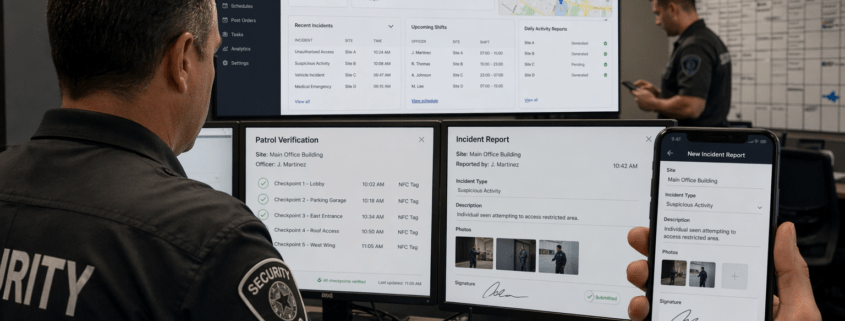
GuardMetrics security operations dashboard, patrol verification, incident reporting, and mobile reporting screens.

What Is Security Guard Management Software?

Updated September 2026

How security guard companies and in-house security teams use connected software to coordinate field work, document activity, and maintain management oversight.

Explore GuardMetrics Software
GuardMetrics security operations dashboard, patrol verification, incident reporting, and mobile reporting screens.

Quick Answer: What Is Security Guard Management Software?

Security guard management software helps contract guard companies and in-house security teams coordinate personnel, sites, posts, and shifts. Depending on the product and configuration, it can connect scheduling, patrol and checkpoint records, incident and daily reporting, dispatch, timekeeping, qualifications, and supervisor review.

A guard tour app focuses mainly on patrols and checkpoints. Generic workforce software focuses mainly on employees, schedules, or time. Security guard management software is broader because it supports security-specific work that begins before a shift, continues in the field, and still requires review after the activity is recorded.

GuardMetrics is designed around this broader operating model. Explore GuardMetrics security guard management software to see how these workflows fit together.

Why Manual and Disconnected Processes Create Operational Gaps

Security operations rarely break down because one record does not exist. The larger problem is that the schedule, patrol records, reports, dispatch updates, time records, and follow-up information may live in different places.

A schedule may show who was assigned without showing what happened in the field. A checkpoint scan may show that a location was reached without explaining what the officer observed. A report may document an event but still be difficult for supervisors to find or connect to the correct site, shift, or next action.

Connected software gives authorized officers, supervisors, dispatchers, and managers a more consistent way to create, find, review, and use those records. It supports management judgment; it does not replace operating policies, accurate configuration, or supervisor review.

What Does Security Guard Management Software Do?

At a high level, security guard management software connects the work performed before, during, and after a security shift.

Before the Shift

Managers organize clients, sites, posts, schedules, instructions, and relevant qualification requirements. Security guard scheduling software can help coordinate recurring coverage, open shifts, and live schedule changes.

During the Shift

Officers use supported devices to document patrols, scan configured checkpoints, submit activity and incident reports, and respond to assigned tasks or dispatch events. A guard tour system creates records of configured patrol and checkpoint activity, while security guard incident reporting software provides a structured way to document specific events.

After the Shift

Authorized supervisors and managers can review reports, patrol records, exceptions, timekeeping information, dispatch status, and qualification context. Those records can support internal follow-up, client communication, and payroll or billing reconciliation where the applicable features are enabled.

See How GuardMetrics Connects Security Workflows

See how GuardMetrics can help your team schedule coverage, document patrol and incident activity, manage dispatch events, and review operations in a connected system.

See GuardMetrics in Action

Common Security Guard Management Software Capabilities

Available capabilities vary by platform, selected features, configuration, permissions, and operating requirements. Common security guard management software capabilities can include:

  • Guard scheduling and shift-coverage management
  • Patrol and checkpoint records using QR codes, NFC tags, timestamps, and location context
  • Mobile activity and incident reporting with configured photos, signatures, and required fields
  • Dispatch-event intake, assignment, status, and follow-up
  • Post instructions, tasks, and configurable forms
  • Timekeeping and administrative reconciliation
  • License, certification, qualification, and expiration visibility
  • Multi-site reports and management views

The important distinction is not simply how many features a platform lists. It is whether the records created by one part of the operation remain connected to the people, sites, posts, shifts, and management processes that need them.

For a closer look at the platform capabilities, review the GuardMetrics security guard management software features.

Potential Benefits of a Connected Security Operations System

When the software is configured around the operation’s real workflows and used consistently, it can help reduce:
  • Scattered or missing operational records
  • Gaps between the schedule and documented field activity
  • Delayed incident and activity reporting
  • Manual reconstruction of events after a shift
  • Limited visibility into exceptions requiring supervisor attention
  • Inconsistent internal and client-facing documentation
  • Qualification or credential concerns being discovered too late

Results depend on configuration, record accuracy, personnel adoption, management processes, and the capabilities selected. Software does not guarantee compliance, eliminate liability, prevent every scheduling mistake, or remove the need for management review.

Who Uses Security Guard Management Software?

Contract Security Guard Companies

Contract guard companies can use the software to coordinate officers, client sites, posts, schedules, patrol activity, field reporting, dispatch events, time records, and service documentation across their operations.

In-House Security Teams

In-house security departments can use the same type of system to organize security personnel, locations, patrols, incidents, assignments, and management review within their own organization.

Both groups may operate at one location or across multiple sites. The appropriate system structure depends on the organization’s operating model, responsibilities, permissions, and selected capabilities.

How Should You Evaluate Security Guard Management Software?

Start with the workflows your team actually performs. Ask the vendor to demonstrate a representative schedule, patrol or checkpoint record, field report, dispatch event, qualification concern, and management-review process using a configuration relevant to your operation.

Confirm which capabilities depend on selected features, user permissions, accessible sites, settings, integrations, or customer configuration. A useful evaluation should show how information moves from assignment through field activity and management follow-up, rather than merely display a list of menu items.

For a more detailed evaluation framework, use our security guard management software comparison guide.

Security Guard Management Software FAQs

How is security guard management software different from a guard tour system?

A guard tour system focuses primarily on patrol routes, checkpoints, scans, and patrol records. Security guard management software is broader because it can connect guard tours with scheduling, reporting, dispatch, timekeeping, qualifications, post information, and supervisor review.

How is security guard management software different from generic workforce software?

Generic workforce software usually centers on employee scheduling, attendance, payroll, or human-resources processes. Security guard management software adds security-specific workflows such as patrol verification, checkpoint activity, incident and daily reporting, dispatch events, site and post instructions, and operational review.

Is security guard management software cloud-based?

Security guard management software can be cloud-based. Buyers should confirm access requirements, supported devices, permissions, security controls, connectivity needs, and offline limitations with each provider.

Does GPS provide continuous officer tracking?

Not necessarily. A system may associate GPS or location context with clock activity, patrol records, checkpoint scans, reports, or other configured events. Continuous location visibility depends on the product, enabled features, device permissions, connectivity, settings, and operating workflow.

Can security reports be generated and shared automatically?

Some platforms support digital forms, scheduled reporting, report generation, and configured distribution workflows. Exact automation, recipient access, review requirements, and delivery options vary by system and configuration. Supervisors remain responsible for reviewing records according to company policy.

Can both small and large security operations use this type of software?

Potentially. Suitability depends on the number of personnel and sites, required workflows, permissions, implementation support, configuration, and how consistently the organization will use the system. A product demonstration should use a representative operating scenario rather than assuming fit based only on company size.

See How GuardMetrics Fits Your Security Operation

Bring one representative workflow—a weekly schedule, patrol requirement, incident form, dispatch scenario, or reporting need—and see how GuardMetrics can support it. A focused demonstration can show where configuration, permissions, and selected features fit your operation.

Request a GuardMetrics Demo
March 22, 2026
GuardMetrics News

How Modern Guard Tour Systems Prove Patrols in Real Time

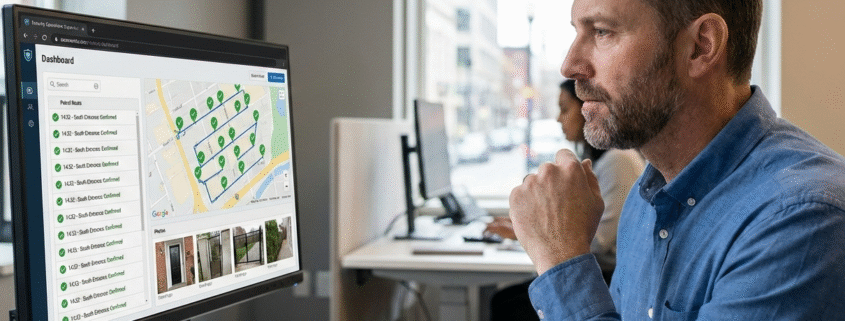
Security operations supervisor reviewing GPS-verified patrol routes, timestamps, and checkpoint confirmations in a guard tour system dashboard.GuardMetrics

Guard tour system proof has become a critical requirement for security companies as clients increasingly expect clear, verifiable evidence that patrols were completed as contracted.

How do security companies prove guards completed their patrols?
Security companies prove patrol completion using GPS-verified location data, automatic timestamps, digital checkpoints, photos, and incident reports that create a tamper-resistant, time-stamped record of where guards were, when patrols occurred, and what was observed on site.

Why Proof & Accountability Matter in Modern Security Operations

Clients no longer accept paper logs or verbal confirmation. They expect verifiable, objective proof that contracted patrols were completed correctly.

For security operators, proof isn’t just about client confidence—it’s about reducing disputes, preventing liability exposure, protecting contracts, and eliminating “he said / she said” scenarios.

Modern guard tour systems exist to solve this accountability gap.

What Evidence Do Clients Expect From Security Providers?

Today’s clients—especially commercial, industrial, healthcare, and enterprise customers—expect documented, auditable proof of service delivery.

GPS-Verified Location Data

GPS confirms that a guard was physically present at a specific site—not checking in remotely or retroactively.

  • Confirms patrol routes
  • Verifies on-site presence
  • Prevents missed or shortcut patrols

GPS guard tracking is now considered a baseline requirement by many clients.

Time-Stamped Activity Logs

Automatic timestamps prove patrols occurred at the correct time, in the correct order, and without manual data entry.

This removes reliance on handwritten logs or end-of-shift reporting and creates a defensible audit trail.

Security patrol reporting tools make this documentation instantly accessible.

Digital Checkpoints

Digital checkpoints confirm guards reached required patrol points. These may include QR codes, NFC tags, location-based verification, or Bluetooth beacons for indoor environments where GPS accuracy is limited.

This replaces:

  • Initials on paper logs
  • Manual sign-offs
  • Supervisor assumptions

Checkpoint verification is one of the fastest ways to eliminate patrol disputes.

Photos & Incident Documentation

Photos and incident notes provide contextual proof that raw data alone cannot.

Clients value:

  • Visual confirmation
  • Documented hazards or incidents
  • Immediate visibility into site conditions

Mobile incident reporting software strengthens both accountability and client trust.

How Guard Tour Systems Prevent Missed Patrols in Real Time

The best guard tour systems don’t just document problems after the fact—they help prevent them entirely.

Modern platforms:

  • Alert supervisors when checkpoints are missed
  • Flag late or incomplete patrols immediately
  • Provide live visibility into active shifts
  • Eliminate reliance on end-of-shift paperwork

This allows issues to be corrected while they still matter, not after a client complaint.

Why Paper Logs and Legacy Systems Fail Under Scrutiny

Legacy Method Risk
Paper patrol logs Easily altered or incomplete
Spreadsheets No real-time verification
Manual sign-offs No location validation
End-of-shift reports Too late to correct issues

When clients demand proof—or documentation is reviewed during a dispute—these systems fail quickly.

What Counts as Acceptable Proof in Security Contracts?

From a client’s perspective, acceptable proof must be:

  • Automatic (not manually entered)
  • Time-stamped
  • Location-verified
  • Tamper-resistant
  • Easy to report and audit

If proof requires explanation or trust, it’s not strong enough.

👉 This is where modern security guard management software separates professional operators from outdated competitors.

Turning Proof Into a Competitive Advantage

Security providers who can prove performance instantly gain more than compliance.

They can:

  • Win higher-value contracts
  • Reduce disputes and chargebacks
  • Shorten sales cycles
  • Defend against false claims
  • Operate with fewer supervisors and less admin time

Proof becomes a sales advantage, not just a safeguard.

See How GuardMetrics Captures Proof Automatically

GuardMetrics was built specifically to close the accountability gap in security operations.

GuardMetrics automatically captures:

  • GPS-verified patrol data
  • Time-stamped checkpoint activity
  • Photo and incident documentation
  • Real-time supervisor visibility
  • Client-ready audit reports

See how GuardMetrics captures proof automatically

February 10, 2026
GuardMetrics News, Uncategorized

Mobile Access Control Is Taking Over — Here’s What It Means for Your Security Company’s Profit

Security guard using mobile device for real-time patrol verification in a smart buildingGuardMetrics

If you’re running a security guard company right without a Security Guard Management System, you’ve probably felt it firsthand: clients want more visibility, reporting takes too long, and the “where was the guard?” conversations are eating up time you don’t have. Meanwhile, buildings are getting smarter with mobile access control and touchless credentials—so expectations keep rising. This post breaks down what that shift means for your margins, where profit really leaks in guard operations, and how to tighten accountability without adding more admin work. A modern security guard management system can protect your margins and reduce admin drag.

Between rising wages, no-shows, last-minute schedule changes, and clients demanding more documentation, the margin gets squeezed fast.

And now there’s another shift happening that’s changing client expectations:

Access control is going mobile.

Traditional keycards are being replaced by smartphone-based access systems (often using Apple Wallet or similar platforms), with FaceID or fingerprint authentication built in.

That’s good news for building security.

But for security guard companies, it creates a new reality.

Smart Buildings Expect Smarter Security Vendors

When a client upgrades to mobile or touchless credentials, they start thinking differently.

They begin expecting:

  • More visibility
  • Faster reporting
  • Stronger accountability
  • Proof patrols were completed
  • Cleaner documentation when something goes wrong

And if your operation still runs on paper logs, manual reports, or end-of-shift “catch-up,” you’ll feel it.

Not because your guards aren’t working — but because the client can’t see it.

That’s where profit gets lost.

The Real Profit Leak in Guard Operations (It’s Not Just Payroll)

Payroll is your biggest expense.

But the hidden margin killers usually look like this:

1) Admin time that never gets billed

Supervisors and office staff spend hours chasing:

  • Paper logs
  • Timestamps
  • Patrol notes
  • Incident details
  • Missing reports

That time adds up quickly, and most companies don’t recover it.

2) Client disputes over coverage

Every security company deals with it:

  • “Was the guard actually there?”
  • “Did patrols happen?”
  • “Why did nobody respond?”
  • “Where’s the report?”

Even when your team did the job, you still lose time defending it.

3) Missed patrols and inconsistent performance

It happens in every company at some point:

  • A checkpoint gets skipped
  • Someone cuts a corner
  • A guard forgets to log something
  • A report is late

Those aren’t just operational issues. They become:

  • Client complaints
  • Contract risk
  • Refund pressure
  • Lost renewals

4) Slow reporting slows billing

The longer reports take, the longer invoices take.

If you have “reporting drag,” you often end up with “cash flow drag.”

Why Advanced Access Control Makes This More Serious

Mobile credentials and identity-based access control are raising the baseline.

Clients are increasingly used to systems that tell them, instantly:

  • Who entered
  • When
  • What door
  • What credential
  • Whether it was authorized

So when it comes to security coverage, the expectation becomes:

“We should be able to see what’s happening in real time.”

That expectation doesn’t just affect your client relationship.

It affects your pricing power.

Because when clients can’t see value clearly, they push on price.

A Company With a Security Guard Management System Competes on Value (Not Price)

When you can show clean proof of coverage, you stop sounding like “just another guard company.”

You become the professional operation that can say:

  • “Here’s exactly what happened.”
  • “Here’s when it happened.”
  • “Here’s who handled it.”
  • “Here are the photos.”
  • “Here are the reports.”

That changes renewal conversations.
It reduces disputes.
It protects margins.

Where GuardMetrics (Security Guard Management System) Protects Profit

GuardMetrics is a security guard management system built to increase accountability, reduce admin work, and help you prove coverage to clients in real time.

Real-time accountability (without chasing guards)

  • Live visibility of patrol activity
  • Checkpoint verification
  • Cleaner proof of coverage

Faster, simpler reporting

  • Reports are created as activity happens
  • Less end-of-shift catch-up
  • Fewer missing details and rewrites

Less admin load

When the system captures events in real time, your office isn’t stuck:

  • Calling guards
  • Collecting notes
  • Fixing report gaps
  • Cleaning up documentation

That’s fewer wasted hours every week.

Better client experience (without more work)

Clients don’t just want guards. They want confidence.

GuardMetrics supports:

  • Branded reporting
  • Clear documentation
  • Professional presentation

That translates into fewer complaints and stronger retention.

How This Protects Your Margins in Real Numbers

Every guard company is different, but here’s where savings show up fast:

  • Less time spent fixing reporting problems
  • Less supervisor babysitting time
  • Fewer client escalations and disputes
  • Faster invoicing and fewer delays
  • Higher retention (fewer lost accounts)

If your team saves even a few hours per week per site, that’s real money.

And if you prevent even one lost contract, the system pays for itself many times over.

Easy Rollout Matters (Because Nobody Has Time for a Complicated Setup)

Most guard companies don’t need a platform that takes weeks to implement.

GuardMetrics is built to roll out quickly:

  • Training usually takes about 45 minutes
  • No special hardware
  • No IT project
  • Your team can start using it right away

That’s important because operational improvements only matter if they’re adopted.

Want to See If It Fits Your Operation?

If you’re looking for a security guard management system that improves margins, reduces admin hours, and delivers real accountability, it’s worth seeing GuardMetrics in action.

Schedule a quick walkthrough here: Get My Free Demo

Or review the platform here: GuardMetrics


January 14, 2026
GuardMetrics News

AI vs. Security Guards: Is the Industry Ready for What Comes Next?

Security guards using AI to help them do their job.

The Security Industry is Entering a Moment of Reckoning.

For decades, guard companies relied on manpower, presence, and intuition as the core of frontline protection. But artificial intelligence (AI) is upending those long-held norms—and forcing leaders to confront a pivotal question:

Is AI a threat to traditional security work, or the breakthrough the industry has been waiting for?

Despite the fears and speculation, the truth is becoming impossible to ignore: AI isn’t replacing guards—it’s exposing vulnerabilities, closing gaps, and amplifying the effectiveness of the teams who embrace it.

Security companies that adopt AI-powered tools are rapidly outperforming those that cling to old, manual processes. And as incidents grow more complex and expectations rise, the divide between AI-enabled teams and traditional operations is widening fast.

Below, we break down the ways AI is transforming the security landscape—and why forward-thinking guard companies are adopting solutions like GuardMetrics AI Refine™, an artificial intelligence tool built directly into the GuardMetrics guard management system to automatically elevate guard report writing.

  1. AI Is Winning the War Against Missed Surveillance Events

Human attention is limited. AI attention isn’t.

Modern security cameras generate endless streams of footage—far too much for any human to monitor with perfect accuracy. AI-powered video analytics, however, can watch every feed, every second, without fatigue or bias.

AI systems now detect:

  • Loitering
  • Unauthorized access attempts
  • Perimeter breaches
  • Aggressive behavior
  • Suspicious patterns humans miss under pressure

When something is off, AI flags it instantly—long before a supervisor might notice.

This isn’t replacing guards. It’s protecting them from failure points they can’t control.

  1. AI Responds to Threats in Seconds—Not Minutes

In security, response time is everything. The advantage of AI is speed.

When an anomaly occurs, AI can push instant alerts to supervisors, mobile patrol units, or command centers. In some cases, monitoring officers can even use real-time talk-downs through speakers to deter intruders immediately.

Seconds matter—and AI is shrinking the gap between detection and action.

  1. Predictive Analytics Is Changing How Security Companies Plan

AI doesn’t just react. It predicts.

By analyzing historical data, access records, patterns of movement, and previous incidents, AI can forecast:

  • Where incidents are more likely to occur
  • When certain risks increase
  • Which assets need increased protection
  • How patrol routes should be adjusted

Security companies using predictive analytics are shifting from reactive protection to proactive prevention—a fundamental upgrade in service quality.

  1. AI Dramatically Reduces False Alarms

Traditional systems are notorious for false alarms: wildlife, wind, debris, shadows, reflections—you name it.

AI and machine learning models are now filtering out the noise and identifying true threats with far greater accuracy.
The impact is enormous:

  • Fewer unnecessary dispatches
  • Less wasted labor
  • Reduced liability
  • More trust from clients

No one pays for a guard service that cries wolf. AI keeps attention where it belongs.

  1. Smarter Access Control Means Fewer Vulnerabilities

AI-enhanced access control systems can verify identities with a speed and accuracy that manual checks can’t match.

Facial recognition and behavioral analytics can:

  • Confirm authorized personnel
  • Detect tailgating
  • Flag banned or watchlisted individuals
  • Alert supervisors instantly

The result?
Fewer breaches. Stronger compliance. More secure facilities.

  1. AI Is Eliminating One of the Industry’s Biggest Weaknesses: Report Writing

If there’s one operational area where security companies routinely struggle, it’s reporting.

Rushed guards, poor grammar, vague descriptions, missing details, emotional language—it all leads to client complaints, supervisor rework, and increased liability.

This is exactly where GuardMetrics AI Refine™ is transforming operations.

GuardMetrics AI Refine™

Reports Before and After AI Refine™—an artificial intelligence tool built directly into the GuardMetrics guard management system—automatically improves guard report writing the moment a report is submitted.

It takes raw officer notes and enhances them by:

  • Correcting grammar and spelling
  • Improving clarity and professionalism
  • Using proper security terminology
  • Adding structure and flow
  • Preserving the facts and intent of the guard’s original account

For example:

A rough, inaccurate report – “Saw a bum sleping by the gate and made him go awy.”

Becomes a polished, defensible report – “At approximately 03:30 hours, a transient individual was observed sleeping near the perimeter gate. The subject was awakened and escorted off company property.”

This is the standard clients expect—and security companies deserve.

AI Refine™ eliminates supervisor editing, improves client confidence, and dramatically elevates the professionalism of every incident and activity report your officers produce.

Simply put: It fixes one of the industry’s most consistent weaknesses instantly.

  1. Autonomous Tools Are Expanding What Security Teams Can Cover

AI-powered drones and robotic patrol units are extending the reach of human guards—especially across large industrial sites, campuses, ports, and remote properties.

These tools can:

  • Scan large areas faster than foot patrols
  • Stream live video back to command
  • Detect abnormalities automatically
  • Keep humans out of dangerous situations

Guards are still essential—but AI is giving them backup that never tires and never blinks.

The Divide Is Growing—Which Side Will Your Security Team Be On?

The shift is already underway.

Security companies embracing AI are delivering:

  • Faster response times
  • Stronger reporting
  • Fewer errors
  • Clearer accountability
  • Higher client satisfaction

Companies resisting AI are delivering… more of the same.

Clients are starting to notice. So are competitors.

When AI becomes the standard—and it will—only two types of security companies will remain:

  1. Those who upgraded early
  2. Those struggling to catch up

See How AI Can Elevate Your Security Operation

GuardMetrics is helping security companies modernize with tools designed specifically for the realities of guard work—including AI Refine™, the industry’s leading AI-powered reporting enhancement tool.

If you’re ready to see how AI can enhance every layer of guard performance, request a free demo today:

👉 Visit GuardMetrics.com

November 18, 2025
GuardMetrics News

Assassination Attempt Prevention: Warning Signs Security Teams Must Spot

Recognizing the Warning Signs: How Security Teams Can Detect and Disrupt Assassination Attempts

Introduction: Why This Matters Now

Assassination attempt prevention matters because high-profile attempts in the U.S. are occurring with disturbing regularity—not only against presidents or heads of state. The purpose of this article is to help security personnel and in-house teams identify potential killers before they strike.

Potential attackers often live otherwise “normal” lives. They work in healthcare, shop in local stores, attend schools, visit casinos and malls, use social media, and move through residential communities. To the untrained eye, they may blend in completely. For the trained security professional, however, there are behavioral cues and patterns that can help distinguish an ordinary person from someone escalating toward violence.

Recent Cases Underscore the Risk

Just in the last two years (2024–2025), the nation has witnessed multiple targeted killings or near-misses:

  • Charlie Kirk was killed in Utah (2025) by a 22-year-old assailant with a rifle.
  • Two Israeli Embassy staffers were murdered outside the Capital Jewish Museum in Washington, D.C. (2025) by a shooter with antisemitic motives.
  • Minnesota legislators Melissa and Mark Hortman were killed, and Sen. John Hoffman and his wife wounded, in a politically motivated attack (2025).
  • Governor Josh Shapiro’s residence was set on fire in an attempted assassination (2025).
  • Donald Trump survived two separate attempts within months—one at a rally in Pennsylvania and another at his golf course in Florida (2024).
  • Judge Kevin Mullins (Kentucky, 2024) was murdered inside a courthouse; Judge Mary Kay Holthus (Nevada, 2024) narrowly survived an attack in her courtroom.
  • Brian Thompson, CEO of UnitedHealthcare, was assassinated in Midtown Manhattan (2024), highlighting that corporate leaders are also high-value targets.
  • Federal ICE officers were ambushed in Texas (2025).
  • A police officer was killed near CDC headquarters in Georgia (2025).

These are not isolated anomalies. They illustrate a reality: politicians, judges, diplomats, corporate leaders, healthcare executives, property managers, and even private-sector security staff are potential targets.

Common Traits Among Attackers

Understanding what unites these perpetrators is critical. Security professionals who recognize these patterns can disrupt attacks before lives are lost.

  • Demographics: Predominantly male, often 20–40 years old. Example: Charlie Kirk’s killer was just 22; the Trump rally shooter was 20. This age group has repeatedly surfaced as high-risk.
  • Grievance-Driven: Motives often tied to political extremism, anti-government rage, antisemitism, or personal vendettas. The Minnesota shooter targeted Democratic lawmakers; the D.C. attacker targeted Israelis.
  • Pre-Attack Behaviors: Most telegraphed intent. The Trump rally shooter had a social media trail of anti-Trump rhetoric. Others conducted surveillance or left behind manifestos.
  • Weapon Access: Nearly all relied on firearms, but others used arson (Governor Shapiro’s attacker) or direct physical violence (Judge Holthus’s courtroom assault).
  • Psychological Indicators: Several displayed delusional thinking, radicalization, or mental health struggles. For example, Ryan Wesley Routh, arrested near Trump’s golf course, was described by evaluators as “delusional.”

👉 Takeaway for teams: These traits are rarely hidden. They are observable when staff, community members, and security personnel are trained to recognize them.

Assassination attempt prevention: female guard monitoring multiple CCTV feeds for threat assessment

Technology and human vigilance work together: surveillance monitoring is a key tool in modern threat assessment and assassination attempt prevention.

Red Flags Security Teams Should Watch For

– Whether you are managing a casino floor, healthcare facility, residential community, shopping mall, or corporate headquarters, these behaviors should trigger closer scrutiny:

– Online Expressions of Grievance: Violent posts targeting individuals, institutions, religions, or ethnic groups.

– Reconnaissance Activity: Repeated site visits, photographing entrances/exits, asking unusual questions about security, or “testing” staff responses.

– Escalating Behavior: A sudden increase in agitation, confrontational interactions, or obsessive focus on a leader/organization.

– Weapon Preoccupation: Talking about, displaying, or attempting to bring weapons onto property.

– Isolation and Radicalization: Withdrawal from normal routines, coupled with immersion in extremist rhetoric or conspiracy theories.

– Direct or Leaked Threats: Emails, calls, letters, or social posts promising violence—even if vague or boastful.

Action Steps for Security Leaders

To move from awareness to action, firms and in-house teams should:

  1. Establish Threat Intake Channels – anonymous reporting, tip lines, and staff training on what to report.
  2. Form Threat Assessment Teams – combine security, HR, management, and law enforcement liaison.
  3. Train on Behavioral Indicators – give guards and staff specific checklists for spotting pre-attack cues.
  4. Coordinate with Law Enforcement – maintain open communication with local police, FBI, or fusion centers.
  5. Practice Active-Assailant Drills – include evacuation, lockdown, and medical response (“Stop the Bleed”) in regular training.

Why This Matters to Every Security Professional

Assassination attempts aren’t only about presidents or high-profile activists. They affect judges, legislators, corporate executives, healthcare leaders, and even frontline officers. Every security team is on the front line of prevention.

By learning the warning signs and implementing threat assessment and assassination attempt prevention frameworks, security professionals can help identify potential attackers before they act—and protect the people, properties, and communities they serve. Building repeatable **assassination attempt prevention** processes helps teams act on early indicators and stop violence before it starts.

GuardMetrics security guard management software helps security firms and in-house teams streamline guard tracking, incident reporting, and accountability. More importantly, it supports your mission: keeping people safe in a world where threats are increasingly unpredictable, yet increasingly preventable.

September 17, 2025
GuardMetrics News

Prove It or Lose It: How Security Firms in Property, Healthcare & Casinos Win Big

Prove It or Lose It: How Security Firms Win Big in Property, Healthcare & Casino Markets

Security Firms in Property, Healthcare, and Casinos, Your Reputation Rests on What You Can Prove—Not Just What You Promise

In today’s competitive landscape, security companies serving property management, healthcare facilities, and gaming venues must deliver more than just presence—they need verifiable results. Clients expect everything from GPS-verified patrols to audit-ready documentation, and GuardMetrics delivers the digital proof they demand.

Whether you serve property portfolios, healthcare facilities, or casino floors, the companies that thrive are those using technology to deliver transparency, reduce liability, and prove measurable value.

Why Security Companies Across Property, Healthcare & Gaming Trust GuardMetrics

GuardMetrics empowers security companies to win premium contracts in property management, with healthcare facilities, and gaming casinos by proving performance, reducing liability, and delivering compliance-ready results.

1. Property Management Clients — Win and Retain Contracts

The Opportunity:
Property managers must keep buildings safe and compliant while keeping insurance premiums low and tenants happy. They switch vendors quickly if these needs aren’t met.

The Risk:
Without verifiable patrol logs and incident tracking, your guards could be seen as “just a cost.”

Security Guard working for a Security Firm in Property Healthcare and Casinos

Guard on post at a property that her security firm manages.

  With GuardMetrics, Security Firms Can: 

• GPS-verified patrols for tenant and board transparency

• Branded digital reports that build trust and reduce liability

• Real-time KPIs like response times and issue resolution

Why It Matters:
GuardMetrics turns Security Firms in Property Healthcare and Casinos from vendors into compliance partners—securing long-term contracts and referral.

2. Healthcare Clients — Prove Compliance, Protect Patients

The Opportunity:
Hospitals and multi-building healthcare campuses demand HIPAA-aware security and documentation partners. With GuardMetrics, firms can deliver scheduled patrol logs, incident escalation for elopements or breaches, and audit-ready reporting that keeps clients compliant and secure.

The Risk:
If you can’t show compliance with healthcare regulations or incident response standards, you won’t win or retain these contracts. 

Security Guard working for a Security Firm in Property Healthcare and Casinos

Guard on post at a healthcare facility.

      With GuardMetrics, Security Firms Can:   

• Track officer patrols across large or multi-building campuses

• Log and escalate incident reports like patient elopements or unauthorized access

• Provide audit-ready reports for compliance reviews

• Build a reputation as a high-accountability healthcare security provider

    Why It Matters:
In healthcare, security is regulatory. GuardMetrics helps security firms in property, healthcare, and casino markets win medical accounts and prove        ongoing value.

3. Casino & Gaming Clients — Deliver Proof to Protect Their License and Your Contract

The Opportunity:
In gaming environments, documentation isn’t optional—it’s mandatory. GuardMetrics enables timestamped patrols, real-time incident logging (from chip disputes to unauthorized access), and regulator-ready analytics—turning your service into a compliance advantage.

The Risk:
Gaming license violations can cost clients millions. If you don’t help them avoid that risk, they’ll find someone who will.

Security Guard working for a Security Firm in Property Healthcare and Casinos

Guard on post at a casino.

With GuardMetrics, Security Firms Can:

• Provide timestamped, GPS-confirmed patrol coverage

• Document incidents in real time, from chip theft to guest disputes

• Deliver regulator-ready reports for gaming commissions

• Offer analytics to optimize guard deployment

   Why It Matters:
Casinos need compliance-ready partners. GuardMetrics enables Security Firms in Property Healthcare and Casinos to deliver exactly that.

Final Thoughts — Why Leading Security Providers Rely on GuardMetrics Across Property, Healthcare & Gaming

Today’s clients want evidence, not promises. Whether you’re securing real estate assets, medical campuses, or gaming floors, GuardMetrics arms you with transparency, accountability, and professionalism that wins contracts—and trust.

✅ Security Owners & Managers: Win new contracts. Retain premium clients. Deliver real results.
👉 See How GuardMetrics Powers Security Firm Growth


August 12, 2025
Page 1 of 3123
GuardMetrics - Security Management Solutions

GuardMetrics helps you streamline and simplify security operations with practical, easy-to-use, comprehensive software solutions. Our official blog contains insight into its use, how you lower costs, reduce manual tasks and much more.

Categories

GuardMetrics
618 E South St
Orlando, FL 32801
Suite 500 Office 548

Phone: (800) 825-6858
support@guardmetrics.com
Honor, integrity, public trust, courage; these are more than words to the GuardMetrics team, and we know that the same is true for you. In a world where these standards often seem in short supply, we are proud to stand with you in the protection and service to the security of others.

Search Our Site

Navigate Our Site

  • Contact Us
  • Features
  • Advantages
  • Privacy Policies
©2025 GuardMetrics LLC. All rights reserved. - powered by Enfold WordPress Theme
  • LinkedIn
  • Mail
  • Contact Us
  • Features
  • Advantages
  • Privacy Policies
Scroll to top