
Security Guard Timekeeping Software
A scheduled shift is not the same as a reviewed time record
Your schedule may show a fully staffed post from 7 a.m. to 3 p.m. The time record may show a later start, a missing clock-out, or work that was never linked to the assignment. Those are different problems—and each needs a different response.
When the explanation is scattered across an officer’s text, a supervisor’s notes, and a spreadsheet, the office has to reconstruct what happened before it can confidently use the hours. That means more follow-up and less time for managing the operation.
GuardMetrics gives authorized managers a structured way to compare recorded time with the assignment, investigate discrepancies, correct the record when appropriate, and review the result. The schedule supplies the plan; management still confirms the work.
Record officer clock-ins and clock-outs on mobile
When scheduling and Time Keeping are enabled, officers can open a published assignment in My Shifts and use the available Clock In and Clock Out or End Shift controls. When acknowledgment is required, the officer completes that step before starting the eligible shift.
The available clocking actions follow your operation’s settings. The date and time window, selected site, required location or QR/NFC checks, device permissions, network connection, and an already-active shift may affect the process. These controls are configuration-dependent, not a universal requirement for every customer.
That gives your officers a defined way to record the beginning and end of work, while giving management time entries to review against the assignment and the work actually performed.
Compare scheduled hours with recorded time
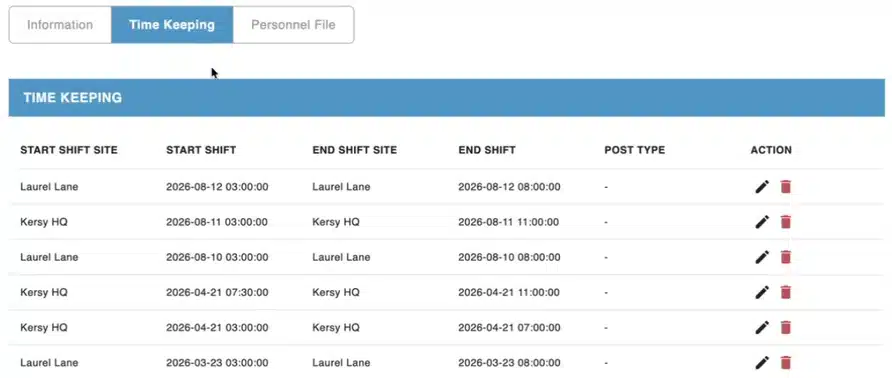
When the relevant modules are enabled, the Working schedule provides the live weekly assignment context. Authorized managers can use Manage Timekeeping to inspect the clock-in and clock-out segments associated with a shift, view their duration, and correct or link records when appropriate.
Start by confirming the officer, site, post, and work period. Then compare the scheduled times with the recorded times. A difference may reflect a late arrival, additional work, an incomplete entry, or a record attached to the wrong assignment. Do not replace recorded time with scheduled time simply to make the numbers match.
Use security guard scheduling software to plan and change coverage. Use timekeeping review to understand the hours recorded against that plan.
Resolve the exceptions that create extra office work
A time record is most useful when your team has a clear way to deal with the entries that do not look right. GuardMetrics supports several distinct review and correction paths.
An officer forgot to clock out
Time was recorded but never linked to a shift
A clock-in or time entry is missing or incorrect
A scheduled officer has no recorded clock-in

Illustrative workflow—not a customer result.
See how your team would resolve a timekeeping discrepancy
Bring a missed clock-out, an unlinked shift, or a time record your office had to investigate. See how GuardMetrics can help your team review the record, make an authorized correction, and prepare it for the next step.
Review worked time in the Time Approval Queue
The Time Approval Queue gives authorized reviewers a work list for a selected site and payroll week. From the Non-approved tab, managers can review the officer, site or position, scheduled and actual times, and hours before signing off.
When a correction is needed, Edit Times opens the timekeeping editor. Reviewers can then approve an individual row or selected rows. If an approved entry needs correction, the documented workflow is to unapprove it, edit the times, and approve the corrected row again.
Time approval requires the appropriate user level and Time Approval permission. Being able to build a schedule or manage payroll does not automatically grant that permission. Approval records the operational sign-off; it does not replace verification of the work or determine every pay and billing rule.
Export time records for administrative review
The Time Keeping Report provides officer clock-in and clock-out information, including the officer’s name, start and end dates and times, client location, and total hours for the selected records. Available report results can be downloaded as PDF or CSV files for review outside the platform.
The Time Approval Queue also provides access to the Approved Shifts report, with filters and a CSV export for an itemized review. Approving and unapproving time happens in the queue, not in that report.
These records can support payroll and billing reconciliation when the relevant features are enabled. Your team still needs to verify the worked time, apply the appropriate pay and billing settings, and complete its administrative process. Use the demo to confirm the reports and handoff your team needs.
Keep attendance review separate from patrol verification
Clock-in and clock-out records help explain recorded time. A guard tour system documents patrol and checkpoint activity, while mobile guard reporting provides field activity and incident information. Those records can give an authorized supervisor more context when investigating a discrepancy, but a checkpoint scan does not establish every hour worked.
Timekeeping is part of GuardMetrics security guard management software. It supports the broader operating record without replacing the scheduling, patrol, and reporting workflows your security operation needs.
Evaluate the timekeeping workflow using one real shift
- Officer to record: Can your team use the clocking workflow on its supported devices and under the site conditions where officers actually work?
- Record to reviewer: Which users can investigate an entry, correct a punch, link it to an assignment, and approve the worked time?
- Reviewer to administration: Which reports, filters, and exports fit your process, and who remains responsible for the final payroll or billing review?
See your timekeeping workflow in GuardMetrics
618 E South St
Orlando, FL 32801
Suite 500 Office 548
Phone: (800) 825-6858
support@guardmetrics.com